

Keeping up with WordPress updates takes real effort. Changes can happen fast, and missing an important update can create problems for site owners and professionals alike. That’s why we created ChangelogWP.
ChangelogWP is a centralized hub for WordPress changelogs across plugins, hosting, and more.
We bring all WordPress changelogs together in one place, so anyone who uses or manages WordPress sites can stay current without hassle. Our platform helps WordPress agencies, professionals, and site owners track updates to catch what matters without extra searching.
Key Takeaways
- ChangelogWP centralizes WordPress changelogs, so teams don’t have to hunt across vendor sites.
- WordPress changelogs document new features, improvements, security updates, and bug fixes, helping users decide what to update and when.
- Following changelog listings lets agencies, professionals, and site owners get email notifications when vendors publish updates.
- Centralized changelogs support faster troubleshooting, clearer team communication, and better client trust through transparent update history.
- Getting started is simple: find a changelog, add it to your watchlist, create a free account, and then follow more changelogs.
The Importance of Changelogs Within the WordPress Ecosystem
Keeping WordPress sites running smoothly takes more than hitting the update button. With software updates constantly rolling out, clear communication is key.
WordPress changelogs are more than a log of changes. They connect developers, agencies, professionals, and site owners to the updates that keep our sites secure and feature-rich.
Let’s look at what changelogs are, how they help teams work together, and why transparent communication builds lasting trust with clients and users.
What is a Changelog?
A changelog is a record of changes made to software. In WordPress, this usually means tracking updates for plugins, themes, or core files. Every time a developer adds a feature, fixes a bug, or changes how something works, they add a note to the changelog. This log shows:
- New Features
- Improvements
- Security Updates
- Bug Fixes
For WordPress users, these logs aren’t just technical notes. They help us understand which updates are nice to have (e.g., new features and improvements), which need our immediate attention (e.g., security updates), and which updates resolve our current issues (e.g., bug fixes).
Changelogs for Seamless Collaboration
Success with WordPress often depends on teamwork. Whether you’re the developer, part of an agency, a team of professionals, or a group of site owners, having up-to-date changelogs ensures everyone stays informed.
With detailed changelogs, we can:
- Understand when a particular update was released (date and version number), which is critical for rolling back when something goes wrong.
- Ensure updates are communicated to team members, customers, and users to prevent any unexpected issues.
- Assign timely tasks based on updates, such as immediate patching of security issues, testing new features and improvements, or verifying bug fixes.
Everyone saves time and can easily account for all updates when there is a single, trustworthy source for changelogs.
Building Trust with Clients and Users
Trust is at the heart of every WordPress project. Clear, well-maintained changelogs help us improve our websites and the WordPress services we offer clients.
If the situation arises, sharing proper changelogs with our clients allows us to prove that updates aren’t random or careless. They are thorough, tracked, and followed with care.
Our Mission for ChangelogWP
Every WordPress user understands the challenge of getting lost in a sea of updates. Keeping up with version histories shouldn’t distract us from building great websites or serving our clients.
At ChangelogWP, our purpose is simple but powerful: we want to make finding and tracking WordPress changelogs effortless, saving users time while strengthening the trust and reliability that the WordPress community depends on.
Our mission reaches beyond convenience. We see accurate, accessible changelogs as a key part of safer, more reliable websites for everyone.
Why We Started: Addressing Real Pain Points
As WordPress agencies, professionals and site owners, we wasted so much time finding, bookmarking, and visiting site after site to sift through changelogs for details that we may or may not be interested in.
We’ve seen agencies, professionals, and site owners all face the same headaches:
- Wasted hours finding, bookmarking, visiting, and reviewing changelogs.
- Missing urgent security fixes due to a lack of notifications.
- Juggling too many alert emails, announcements, and dashboards.
By gathering WordPress changelogs into one platform, we put time and control back in the hands of users. Our subscribers can get the updates they need as soon as they happen.
Our Core Values and Commitment to the WordPress Community
We started ChangelogWP with a clear set of values that guide everything we do:
- Transparency: We believe that everyone should have easy access to up-to-date changelogs, and we remain committed to advocating for comprehensive changelogs that accurately tell the story.
- Simplicity: We are here to save you time. Keeping things simple and clean goes a long way toward that goal.
- Community Focus: We listen to everyone in the WordPress community so we can meet real needs.
- Trust: We are here to build a platform that helps everyone maintain safe, reliable WordPress websites.
Our commitment is to the people who make up the WordPress world, whether you run one site or hundreds. We are dedicated to helping people focus on what makes WordPress great: creating, sharing, and building with peace of mind.
ChangelogWP finally solves the hassle of tracking WordPress changelogs.
Key Features of Our Platform
Staying on track with every WordPress changelog shouldn’t be stressful or time-consuming. ChangelogWP helps us manage updates more efficiently by bringing important information to one easy-to-use platform.
Let’s walk through the features that help agencies, professionals, and site owners save time, work smarter, and never miss what matters most.
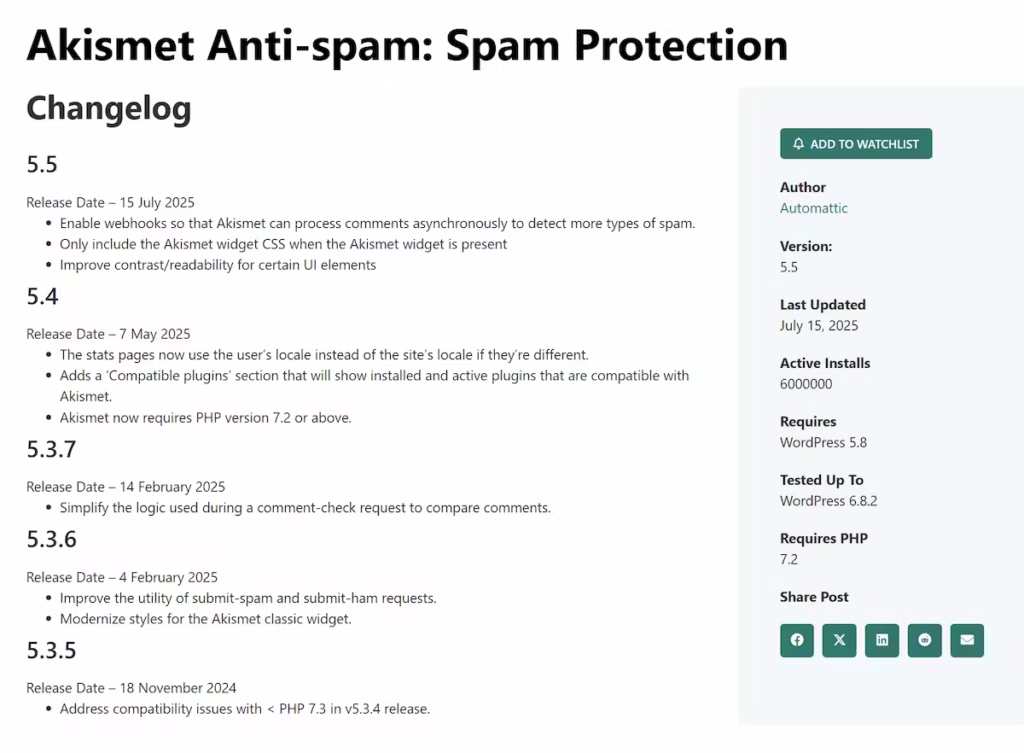
Listings
We create changelog listings for WordPress products and services, complete with details about the brand behind them. You can easily find the listings for solutions that are part of your tech stack or that you’re interested in using.
Listings typically include:
- General Information: Title, Author, etc.
- Technical Information: Version, Last Updated, Active Installs, etc.
- Latest Changelog Updates: Version Number, Changes, etc.
Notifications
Manually tracking every WordPress update wastes valuable time. ChangelogWP takes yet another step toward solving this by allowing you to follow and subscribe to listings to receive notifications as vendors post updates to their changelog.
Notification features:
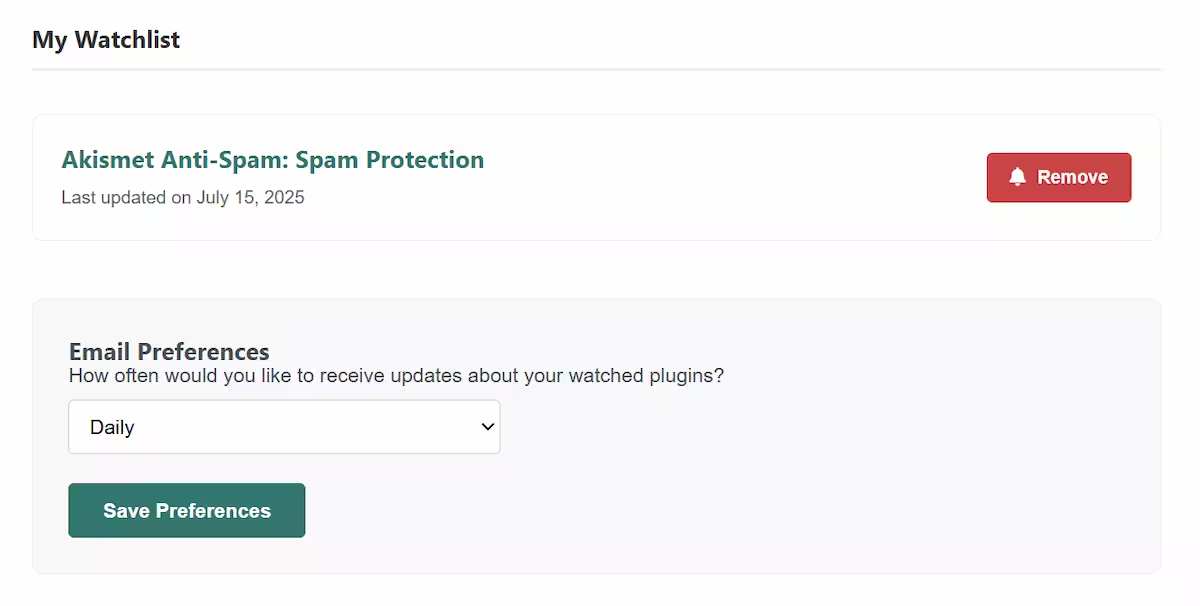
- Add listings to your watchlist and get email notifications sent to your inbox.
- Easily manage your watchlist from your account.
- Choose your desired notification frequency (daily, weekly, or never).
How ChangelogWP Benefits Different WordPress Stakeholders
ChangelogWP isn’t just for one type of WordPress user. It’s designed for anyone who manages, builds, or relies on WordPress.
For Agencies
As an agency, you’re busy running your business and ensuring the integrity of WordPress websites at a larger scale. Save time by subscribing to updates that are important to you and eliminate sifting through individual changelogs.
- Centralized Insight: All changelogs, whether from the core, plugins, or themes, etc., are just one search or notification away.
- Notifications: Agencies can subscribe to listings for solutions within their tech stack or solutions they wish to monitor, receiving key updates directly into their inbox.
- Faster Task Assignment: Project managers can quickly and clearly spot software changes and assign them to the appropriate teams or team members.
For Professionals
As a professional, you’re likely supporting multiple site/page builders and countless plugins while supporting client sites. With such diversity, it’s more crucial than ever to stay informed, and we make it incredibly simple for you to do so.
- Personalized Subscriptions: Only follow the listings for the plugins, themes, and other tools that you use most.
- Quick Troubleshooting: Review changelogs to spot when a bug fix shipped or a feature landed.
- Stay Ahead of Issues: Never miss a security patch that could threaten client projects or your reputation.
- Simple, Direct Info: No need to scan through newsletters, sites, or support forums to find clear answers.
For DIYers
As a DIYer (do-it-yourselfer), you’re running a cupcake e-commerce website that you’re proud of, but you may not be versed in WordPress updates, especially regarding security. We make it super easy to subscribe to important security updates and vulnerabilities.
- Security Awareness: Get alerts when an update fixes a vulnerability, helping you keep your online business safe.
- You’re in Control: Get alerts only for the plugins, themes, etc., you use, so you can decide when to log in and update WordPress.
- Education: We provide our community with information and best practices, which is especially beneficial to DIY site owners.
Getting Started With ChangelogWP
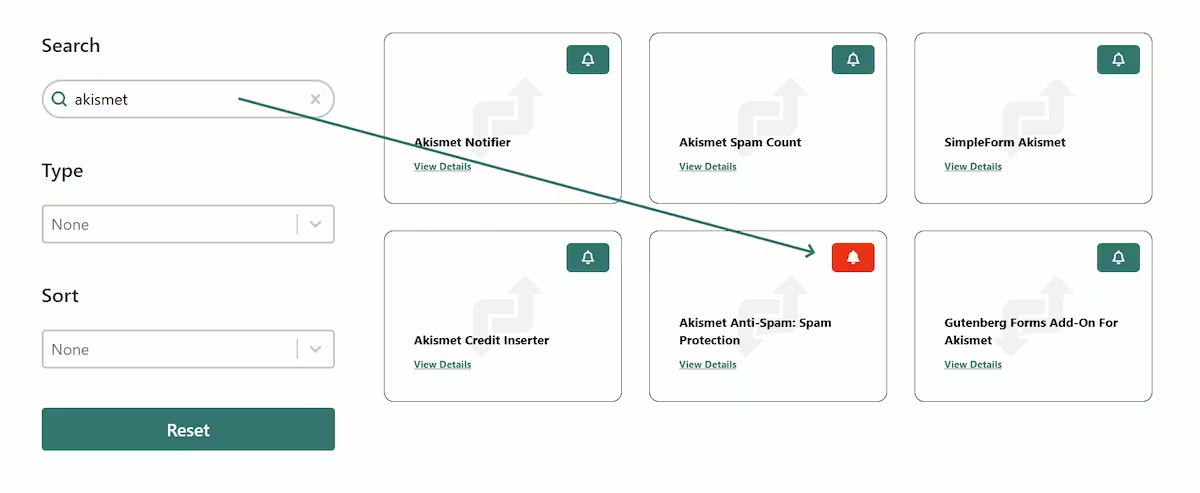
Get notified of updates by subscribing to changelog listings for your tech stack or solutions. Getting started couldn’t be easier!
- Find a changelog of interest and click the bell icon to add it to your watchlist
- Register your free account
- Add more changelogs to your watchlist
Frequently Asked Questions About ChangelogWP And WordPress Changelogs
What Is A WordPress Changelog?
A WordPress changelog is a record of changes made to WordPress core, a plugin, or a theme. It usually lists new features, improvements, security updates, and bug fixes, often tied to a version number and release date.
Why Do WordPress Changelogs Matter for Security?
Changelogs help you spot security updates and prioritize them. If you miss a security fix, you can leave a site exposed longer than needed, which raises risk for site owners and client work.
What Does ChangelogWP Do?
ChangelogWP is a centralized hub that collects WordPress changelogs in one place. It helps agencies, professionals, and site owners track updates without checking each vendor site manually.
How Do Notifications Work in ChangelogWP?
You can follow a changelog and add it to your watchlist, then receive email notifications when the vendor posts changelog updates. You can manage your watchlist from your account and choose a frequency (daily, weekly, or never).
How Do I Get Started With ChangelogWP?
Find a changelog that interests you, click the bell icon to add it to your watchlist, and then register for a free account. Following that, consider adding more changelogs to your watchlist to ensure you receive only the updates you prefer.