

We ran a poll on X, asking folks which day of the week they think the majority of vendors prefer to release their software updates. Due to poll limitations on the X platform, we had to limit the choices to just four days, so we eliminated the three least popular days (based on our stats) — Sat, Sun, and Mon.
Looking at the poll results, below, we see a majority of folks voted Tuesday as being the most popular day to release software updates. Close, but no cigar!
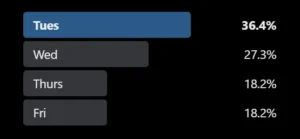
When Most Vendors Ship Software Updates
We automatically gather data from the plugins listed in the WordPress repository to populate their changelog listings on our platform. This gives us a huge sample size of data to pull from.
So, we thought it would be fun to discuss the most popular days of the week that vendors choose to release their software updates. After all, there has always been the “don’t release on fridays” debate, so this is an intriguing topic.
Without further ado, here’s the breakdown of software updates for each day of the week.
- Sunday: 3,421
- Monday: 6,506
- Tuesday: 7,303
- Wednesday: 19,576
- Thursday: 7,180
- Friday: 6,615
- Saturday: 4,158
Most Vendors Ship Updates on Tuesday or Wednesday
Many vendors, as part of the software release life cycle, ship updates midweek. The most common release days are Tuesday or Wednesday. Teams like this window because it balances safety and support. It provides vendors time to watch metrics, answer tickets, and fix issues before the weekend.
This timing matters to us as WordPress agencies. We plan maintenance windows, testing, and client notices around vendor behavior. We also keep an eye out for exceptions — security hotfixes can land any day.
ChangelogWP was created to help communicate these updates. You can add changelogs to your watchlist and optionally be notified via email (daily or weekly) as software updates are released.
Why Midweek Wins for Stability and Support
Midweek deploys fit the safe release window many teams follow. By Tuesday, product and support teams have cleared Monday triage. Engineers are focused. SRE (Site Reliability Engineer) and QA (Quality Assurance) teams have full coverage. If bugs show up, there is time to roll back or ship a software patch before Friday.
This timing helps support volume as well. If an update triggers errors, tickets appear during business hours. Monitoring is staffed. Rollbacks are faster. We avoid the silence of a weekend outage.
Teams often keep change freezes for late Friday. Midweek updates reduce risk to customer SLAs. The result is fewer surprise incidents and smoother upgrades.
Why Monday and Friday Are Usually Avoided
Monday is noisy. Backlogs, fresh incidents, and new tickets fill the morning. New bugs can hide in that noise. It is harder to see a clear signal in logs and analytics. The risk climbs for client SLAs.
Friday sits on the other side. A late Friday release pushes risk into the weekend. Support is thin. On-call costs rise. Many agencies have limited weekend coverage. A critical fix costs more and takes longer on Saturday than on Wednesday.
Potential Risks:
- Missed SLAs due to thin coverage.
- Slower response times and higher on-call spend.
- Client trust is at risk if an outage drags into Monday.
Real-world patterns: Microsoft Patch Tuesday, browsers, Apple, WordPress
We see midweek in the wild, but they are patterns, not strict rules.
- Microsoft ships its monthly security update release on Patch Tuesday, which lands on the second Tuesday of the month. This includes security updates packaged as a cumulative update, often referred to as the latest cumulative update (LCU), applying to the Windows OS via Windows Update. Feature updates follow a separate cadence. Sometimes, security issues require an Out-of-band (OOB) release to address a critical vulnerability. In contrast, Microsoft offers an Optional non-security preview release on the fourth Tuesday. Patch Tuesday sets a strong midweek tone for IT teams, though the community term “Exploit Wednesday” highlights the immediate risk of exploits following the release.
- Chrome and other browsers often publish stable channel updates midweek. Tuesday or Wednesday is common.
- Apple iOS and macOS updates often arrive early to midweek. There are exceptions for events and urgent patches.
- WordPress core targets weekdays for majors and minors. Release candidates and point releases often hit midweek. Popular plugin and theme vendors follow similar habits.
These cycles guide our calendar, reflecting a reliable update servicing cadence. They help us choose test windows and client notices.
Important Caveats: Security Hotfixes, Time Zones, Automation
Some updates don’t always follow a plan.
- Security fixes can ship any day, any hour. Speed beats routine when risk is high.
- Time zones change what we see. Vendors often publish fixes targeting 10 AM Pacific Time (PST/PDT), so a Tuesday morning US release can appear as Wednesday in APAC. Compare in one time zone.
- CI/CD (Automated Software Development) pipelines support staged rollouts through servicing channels. A vendor might roll out to 10 percent on Tuesday, then 100 percent on Thursday. Automation can blur the pattern.
Tip for clean analysis. Compare timestamps in UTC when you map vendor activity.
How We Plan WordPress Maintenance Around Vendor Release Days
Set a Midweek Update Routine That Fits Our Clients
We keep a steady rhythm based on the vendor release schedule. Watch for updates on Tuesday and Wednesday. Apply updates on Wednesday or Thursday, local time. Skip Monday and Friday when we can.
For eCommerce or high-traffic sites, pick low-traffic hours. Late evening or early morning often works best. We also stagger updates by client group. Start with low-risk sites, then move to stores and membership sites. This cuts the blast radius if a bug slips through.
Simple Schedule Example:
- Tuesday Morning: Collect updates (subscribe to changelogs on ChangelogWP) and notes.
- Wednesday Morning: Stage and Test.
- Wednesday Afternoon or Thursday Morning: Deploy to Production.
- Friday: Hold for emergency security fixes only.
Build a Safe Workflow: Staging, Backups, and Rollbacks
We treat each update as a mini release in our Release Management process.
- Test on staging first. Review core features, caching, and checkout flows.
- Take verified backups before production. Keep a tested rollback plan.
- Run a short post-deploy checklist. Purge caches, verify key user flows, scan error logs, and watch analytics for spikes.
This flow fits midweek perfectly. We have time to observe, compare logs, and fix issues before the weekend. If an update fails, we roll back fast and notify the client.
Checklist Example:
- Backups are done and verified.
- Staging passes tests and key flows.
- Production deployment completed.
- Cache purged, assets rebuilt if needed.
- Error logs are clean. Uptime monitors are green.
- Analytics are normal for traffic and conversions.
Stay Informed With ChangelogWP Watchlists
ChangelogWP keeps us in the loop.
- Follow changelogs for software and services we rely on.
- Turn on email alerts to see updates as they land.
- Use searchable listings to review changes, security notes, and breaking changes.
- Build the weekly maintenance queue from these alerts, with a focus on Tuesday and Wednesday.
We track both free and paid software, as well as services like WordPress hosting. Alerts help us plan tests and group similar updates. This saves time and reduces context switching.
Communicate Service Windows and SLAs in Plain Language
Clients need clarity. We publish a midweek maintenance window policy. We explain why we avoid Monday and Friday. We link that choice to uptime and faster fixes.
We set SLAs for emergency security patches. Those can happen any day. We add a shared calendar for planned windows and a simple approval process for high-risk changes, like major core updates or payment gateway changes.
Client Notes:
- Our standard window is midweek and off-peak.
- What we update and how we test.
- How we handle emergency patches.
- Who to contact and how status is shared.
Review the Trend in Our Stack Before We Lock a Schedule
Collect Data From ChangelogWP, Repos, etc.
Before we lock a routine, we map our stack, reviewing recent releases for WordPress core, WordPress plugins, WordPress themes, etc. We include at least the last three to six months to smooth out the noise, tracking the schedules for security updates as part of this process and collecting full release information to ensure completeness.
We list the release dates and convert them to one time zone (preferably UTC), marking each with the product name and version. ChangelogWP speeds up this step since updates are centralized and optionally sent to inboxes.
Make a Simple Release-Day Heatmap to Spot the Peak Days
We can do this in a sheet without code.
- Paste the release dates into a spreadsheet.
- Add a weekday column that converts each date to Monday through Sunday.
- Count by weekday. Use a simple pivot or countif.
- Highlight the top two days.
We will likely see Tuesday or Wednesday at the top, much like Patch Tuesday serves as a benchmark for peak day distribution in security updates. If the pattern shifts by vendor, note that difference. For teams with many tools, repeat for all critical vendors and compare. This gives us a clear picture of peak days.
Example Columns:
- Product
- Version
- Date (UTC)
- Weekday
Tune Auto-Updates and Maintenance Windows Based on the Data
Now we turn findings into action.
- If most releases hit on Tuesday, run staging updates Tuesday afternoon and production Wednesday morning.
- Consider auto-updating low-risk plugins, but pause auto-updates from Friday to Sunday to reduce weekend incidents.
- Security patches and urgent hotfixes can run any day with a quick approval path.
- For major releases, follow an established sign-off process.
Wrap Up
Most vendors prefer Tuesday or Wednesday for releases. We gain stability by aligning our WordPress maintenance to midweek. We test on staging, back up, and deploy during business hours while teams are online. Security updates can appear at any time, necessitating quick fixes, so alerts and a tested rollback path are non-negotiable.
Use our platform to add changelogs to your watchlist, build a midweek routine, and run a three-month check on your stack to confirm patterns.
Protect uptime, cut weekend stress, and build client trust.